Qwen Image Edit 2511 GGUF
Overview
Highlights
- GGUF quantization for efficient local hardware deployment
- Precise image-to-image editing with textual control
- Low VRAM overhead compared to full-precision models
- Apache-2.0 license for flexible commercial integration
- Optimized for fast inference in local pipelines
Usage
# Install Hugging Face transformers
pip install transformers torch# Load model with transformers
from transformers import AutoModel, AutoTokenizer
model = AutoModel.from_pretrained("unsloth/Qwen-Image-Edit-2511-GGUF")
tokenizer = AutoTokenizer.from_pretrained("unsloth/Qwen-Image-Edit-2511-GGUF")Hugging Face Download
We recommend downloading the model via the Hugging Face CLI or Hub SDK.
Guidance:Before downloading, install huggingface_hub with:
pip install -U huggingface_hubCLI Download
Download the full repository
huggingface-cli download unsloth/Qwen-Image-Edit-2511-GGUFDownload a single file to a local folder (e.g. config.json into ./dir)
huggingface-cli download unsloth/Qwen-Image-Edit-2511-GGUF config.json --local-dir ./dirSee the official docs for more CLI options
SDK Download
# 模型下载
from huggingface_hub import snapshot_download
model_dir = snapshot_download('unsloth/Qwen-Image-Edit-2511-GGUF')
Git Download
Make sure git-lfs is installed first
git lfs install
git clone https://huggingface.co/unsloth/Qwen-Image-Edit-2511-GGUF
To skip LFS large-file downloads, use:
GIT_LFS_SKIP_SMUDGE=1 git clone https://huggingface.co/unsloth/Qwen-Image-Edit-2511-GGUFModel files are hosted on the Hugging Face Hub — download directly via HF CLI / SDK / Git, not through this site.
PyTorch / Transformers Usage
Install Transformers
pip install -U transformers torchLoad the model and run inference
from transformers import AutoModelForCausalLM, AutoTokenizer

model = AutoModelForCausalLM.from_pretrained('unsloth/Qwen-Image-Edit-2511-GGUF')
tokenizer = AutoTokenizer.from_pretrained('unsloth/Qwen-Image-Edit-2511-GGUF')
Model Download
We recommend downloading the model via the ModelScope CLI or SDK.
Guidance:Before downloading, install ModelScope with:
pip install modelscopeCLI Download
Download the full repository
modelscope download --model unsloth/Qwen-Image-Edit-2511-GGUFDownload a single file to a local folder (e.g. README.md into ./dir)
modelscope download --model unsloth/Qwen-Image-Edit-2511-GGUF README.md --local_dir ./dirSee the docs for more CLI options
SDK Download
# 模型下载
from modelscope import snapshot_download
model_dir = snapshot_download('unsloth/Qwen-Image-Edit-2511-GGUF')
Git Download
Make sure git-lfs is installed first
git lfs install
git clone https://www.modelscope.cn/unsloth/Qwen-Image-Edit-2511-GGUF.git
To skip LFS large-file downloads, use:
GIT_LFS_SKIP_SMUDGE=1 git clone https://www.modelscope.cn/unsloth/Qwen-Image-Edit-2511-GGUF.gitModelScope 模型页直接下载模型文件;无需将模型文件放在本站服务器。
Notebook Quickstart
Install the ModelScope library
pip install "modelscope[audio,cv,nlp,multi-modal,science]" -f https://modelscope.oss-cn-beijing.aliyuncs.com/releases/repo.htmlLoad the model and run inference
from modelscope.pipelines import pipeline
from modelscope.utils.constant import Tasks

p = pipeline('text-generation', 'unsloth/Qwen-Image-Edit-2511-GGUF')
Full Documentation
---
base_model: Qwen/Qwen-Image-Edit-2511
language:
- en
- zh
license: apache-2.0
pipeline_tag: image-to-image
tags:
- gguf
- quantized
- unsloth
- qwen
widget:
- text: cartoon sloth
output:
url: assets/sloth_cart.png
---
Read our How to Run Qwen-Image Guide! 💜
This is a GGUF quantized version of Qwen-Image-Edit-2511. <br>
unsloth/Qwen-Image-Edit-2511-GGUF uses Unsloth Dynamic 2.0 methodology for SOTA performance.
- Important layers are upcasted to higher precision.
- Uses tooling from ComfyUI-GGUF by city96.
- For more information on how to use and run the model in ComfyUI, read our guide.
<div>
<div style="display: flex; gap: 5px; align-items: center; ">
<a href="https://github.com/unslothai/unsloth/">
<img src="https://github.com/unslothai/unsloth/raw/main/images/unsloth%20new%20logo.png" width="133">
</a>
<a href="https://discord.gg/unsloth">
<img src="https://github.com/unslothai/unsloth/raw/main/images/Discord%20button.png" width="173">
</a>
<a href="https://docs.unsloth.ai"/>
<img src="https://raw.githubusercontent.com/unslothai/unsloth/refs/heads/main/images/documentation%20green%20button.png" width="143">
</a>
</div>
</div>
Samples
<table>
<tr>
<td><img src="assets/sloth_cur.png" width="200"></td>
</tr>
<tr>
<td><img src="assets/sloth_sketch.png" width="200"></td>
<td><img src="assets/sloth_excited.png" width="200"></td>
</tr>
<tr>
<td><img src="assets/sloth_cart.png" width="200"></td>
<td><img src="assets/sloth_starry.png" width="200"></td>
</tr>
</table>
---
<p align="center">
<img src="https://qianwen-res.oss-cn-beijing.aliyuncs.com/Qwen-Image/qwen_image_edit_logo.png" width="400"/>
<p>
<p align="center">
💜 <a href="https://chat.qwen.ai/"><b>Qwen Chat</b></a>   |   🤗 <a href="https://huggingface.co/Qwen/Qwen-Image-Edit-2511">Hugging Face</a>   |   🤖 <a href="https://modelscope.cn/models/Qwen/Qwen-Image-Edit-2511">ModelScope</a>   |    📑 <a href="https://qianwen-res.oss-cn-beijing.aliyuncs.com/Qwen-Image/Qwen_Image.pdf">Tech Report</a>    |    📑 <a href="https://qwenlm.github.io/blog/qwen-image-edit-2511/">Blog</a>   
<br>
🖥️ <a href="https://huggingface.co/spaces/Qwen/Qwen-Image-Edit-2511">Demo</a>   |   💬 <a href="https://github.com/QwenLM/Qwen-Image/blob/main/assets/wechat.png">WeChat (微信)</a>   |   🫨 <a href="https://discord.gg/CV4E9rpNSD">Discord</a>  |    <a href="https://github.com/QwenLM/Qwen-Image">Github</a>  
</p>
<p align="center">
<img src="https://qianwen-res.oss-accelerate-overseas.aliyuncs.com/Qwen-Image/edit2511/edit2511big.JPG#center" width="1600"/>
<p>
Introduction
We are excited to introduce Qwen-Image-Edit-2511, an enhanced version over Qwen-Image-Edit-2509, featuring multiple improvements—including notably better consistency. To try out the latest model, please visit Qwen Chat and select the Image Editing feature.
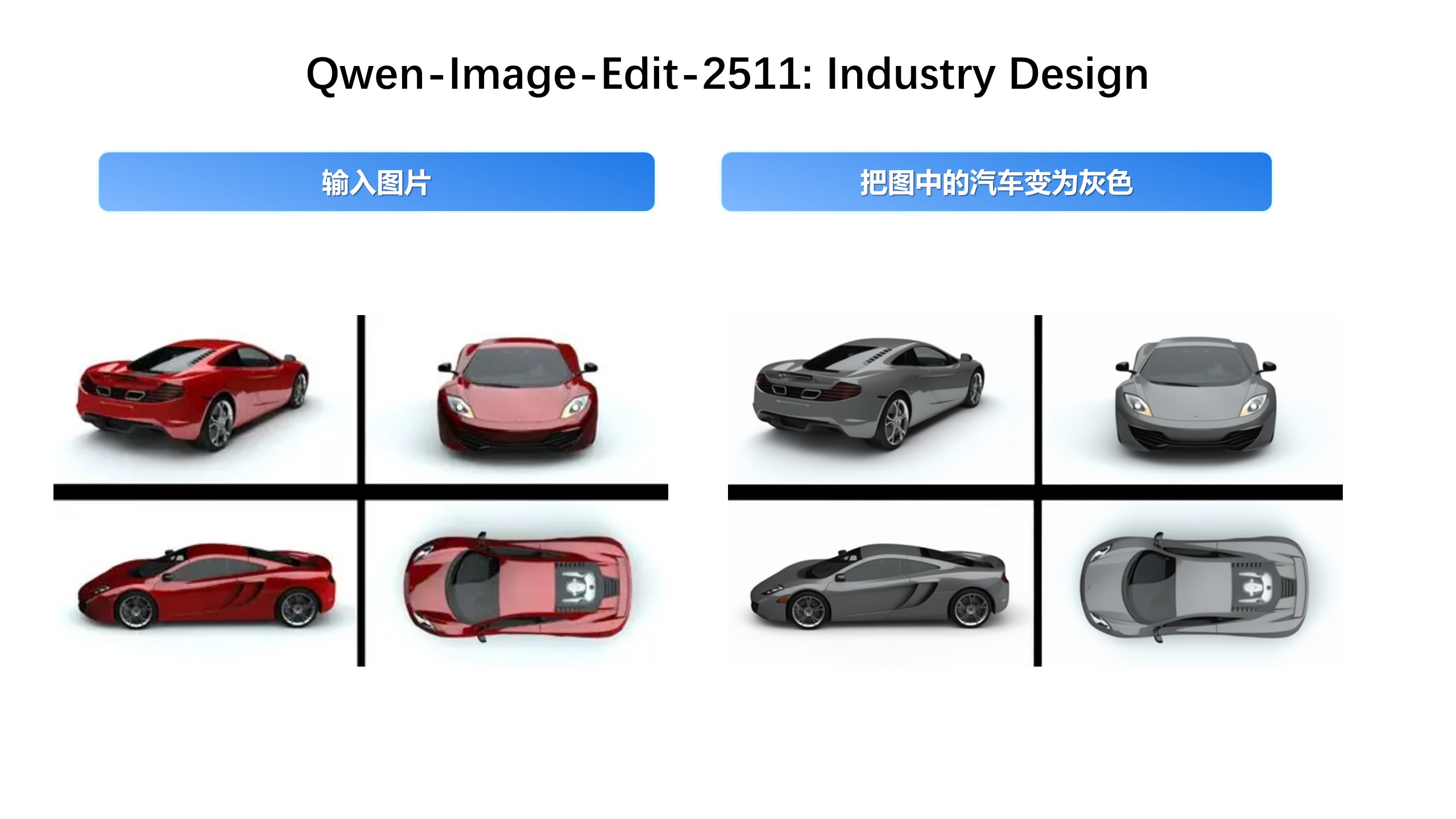
Key enhancements in Qwen-Image-Edit-2511 include: mitigate image drift, improved character consistency,integrated LoRA capabilities, enhanced industrial design generation, and strengthened geometric reasoning ability.
Quick Start
Install the latest version of diffusers
pip install git+https://github.com/huggingface/diffusersThe following contains a code snippet illustrating how to use Qwen-Image-Edit-2511:
import os
import torch
from PIL import Image
from diffusers import QwenImageEditPlusPipeline
pipeline = QwenImageEditPlusPipeline.from_pretrained("Qwen/Qwen-Image-Edit-2511", torch_dtype=torch.bfloat16)
print("pipeline loaded")
pipeline.to('cuda')
pipeline.set_progress_bar_config(disable=None)
image1 = Image.open("input1.png")
image2 = Image.open("input2.png")
prompt = "The magician bear is on the left, the alchemist bear is on the right, facing each other in the central park square."
inputs = {
    "image": [image1, image2],
    "prompt": prompt,
    "generator": torch.manual_seed(0),
    "true_cfg_scale": 4.0,
    "negative_prompt": " ",
    "num_inference_steps": 40,
    "guidance_scale": 1.0,
    "num_images_per_prompt": 1,
}
with torch.inference_mode():
    output = pipeline(inputs)
    output_image = output.images[0]
    output_image.save("output_image_edit_2511.png")
    print("image saved at", os.path.abspath("output_image_edit_2511.png"))
Showcase
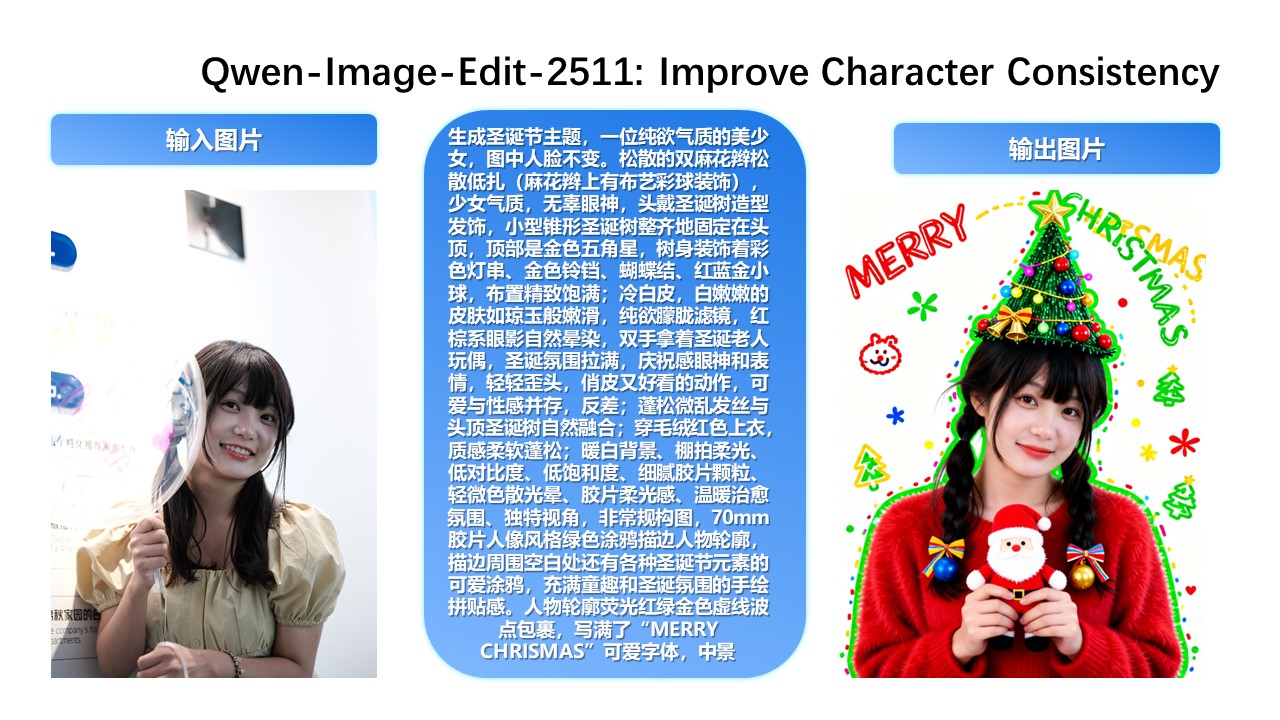
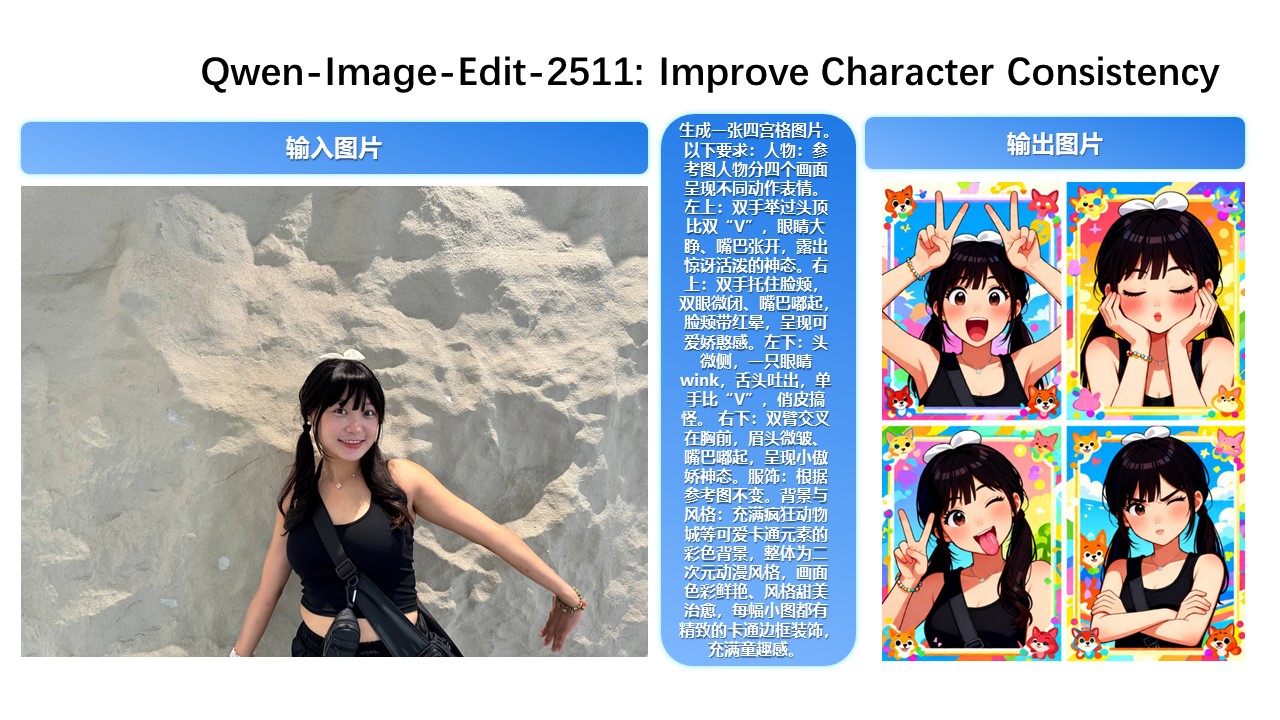
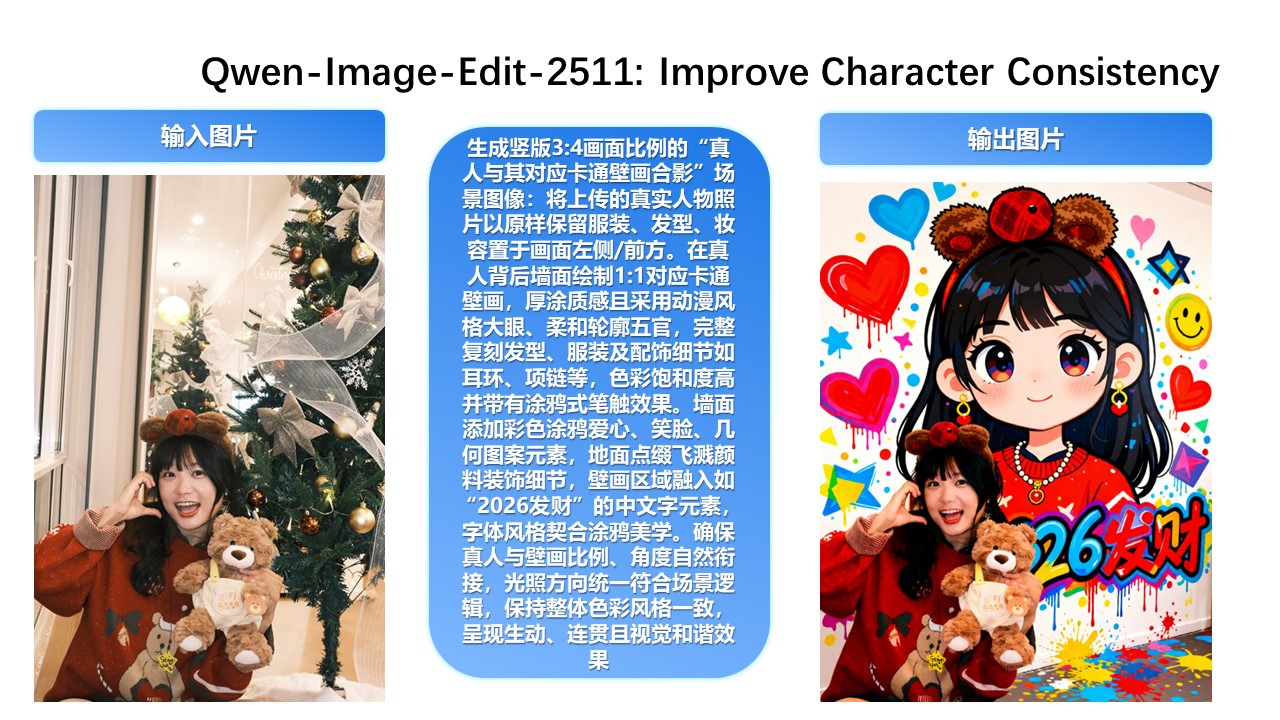
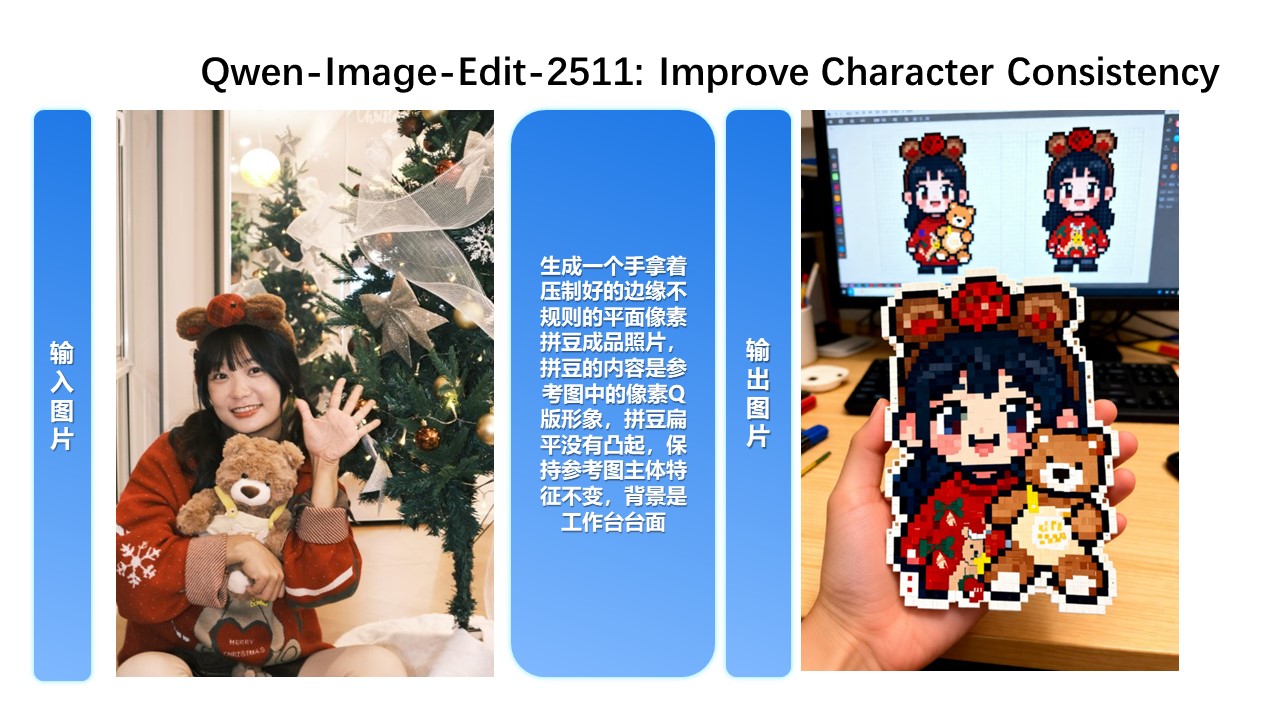
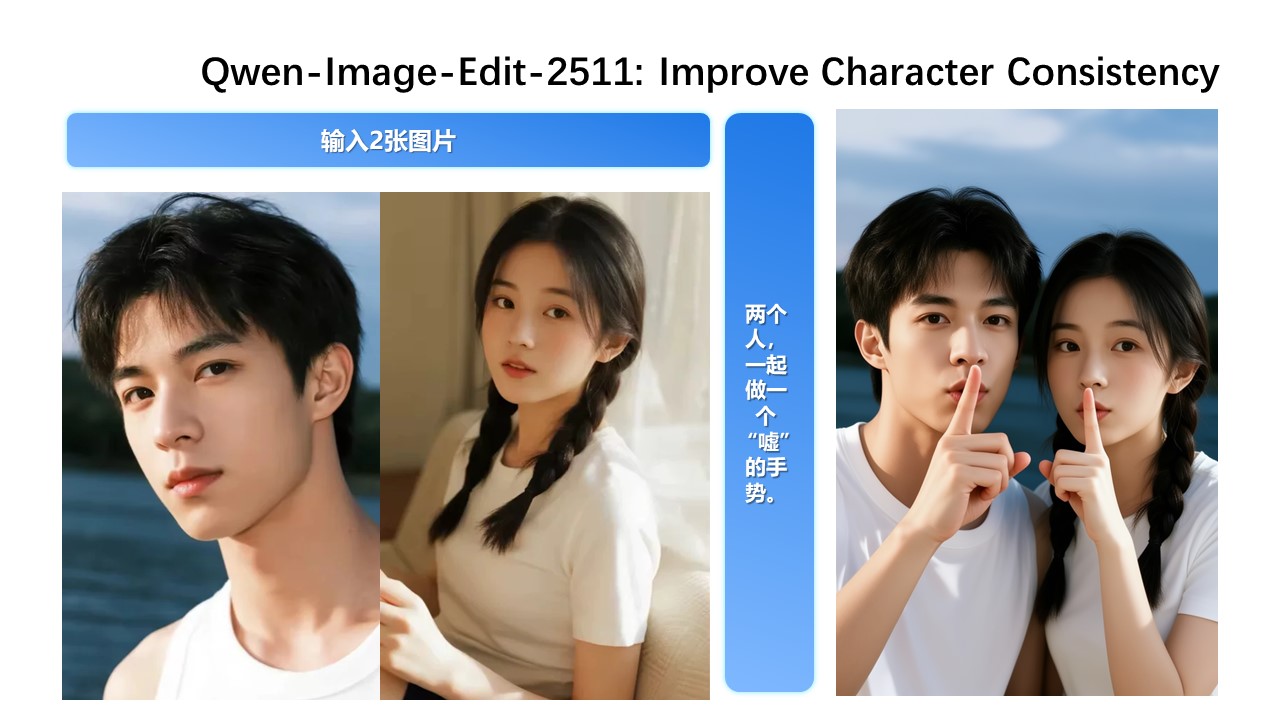
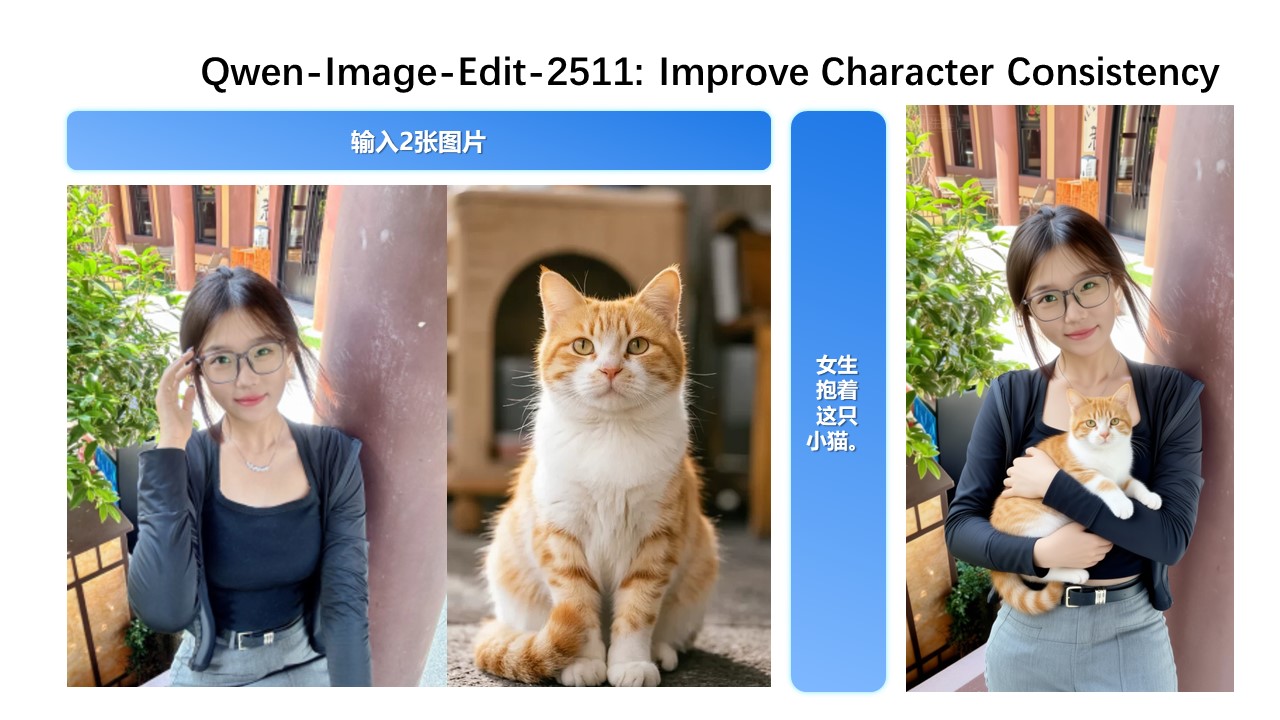
Qwen-Image-Edit-2511 Enhances Character Consistency
In Qwen-Image-Edit-2511, character consistency has been significantly improved. The model can perform imaginative edits based on an input portrait while preserving the identity and visual characteristics of the subject.
Improved Multi-Person Consistency
While Qwen-Image-Edit-2509 already improved consistency for single-subject editing, Qwen-Image-Edit-2511 further enhances consistency in multi-person group photos—enabling high-fidelity fusion of two separate person images into a coherent group shot:
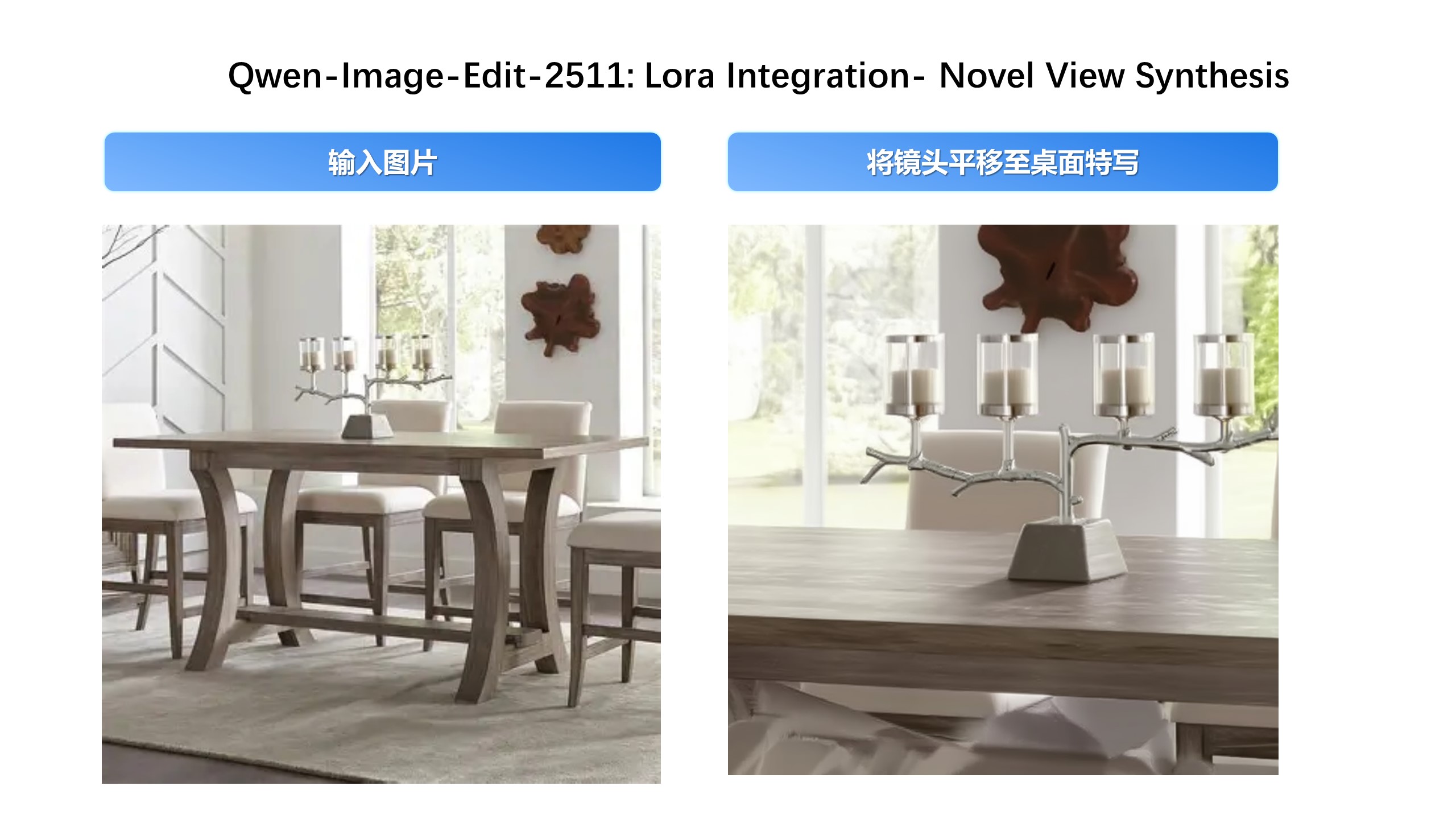
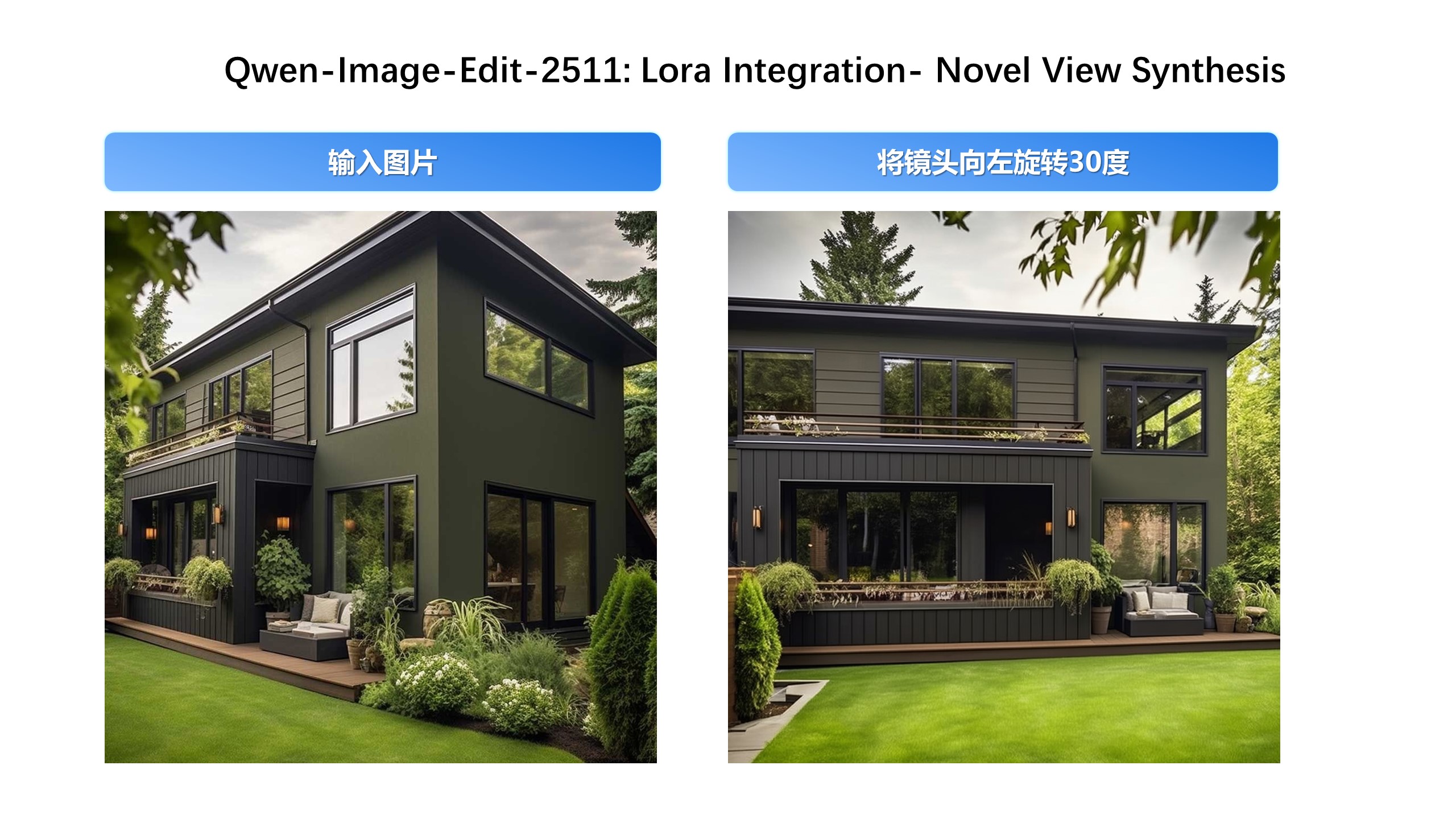
Built-in Support for Community-Created LoRAs
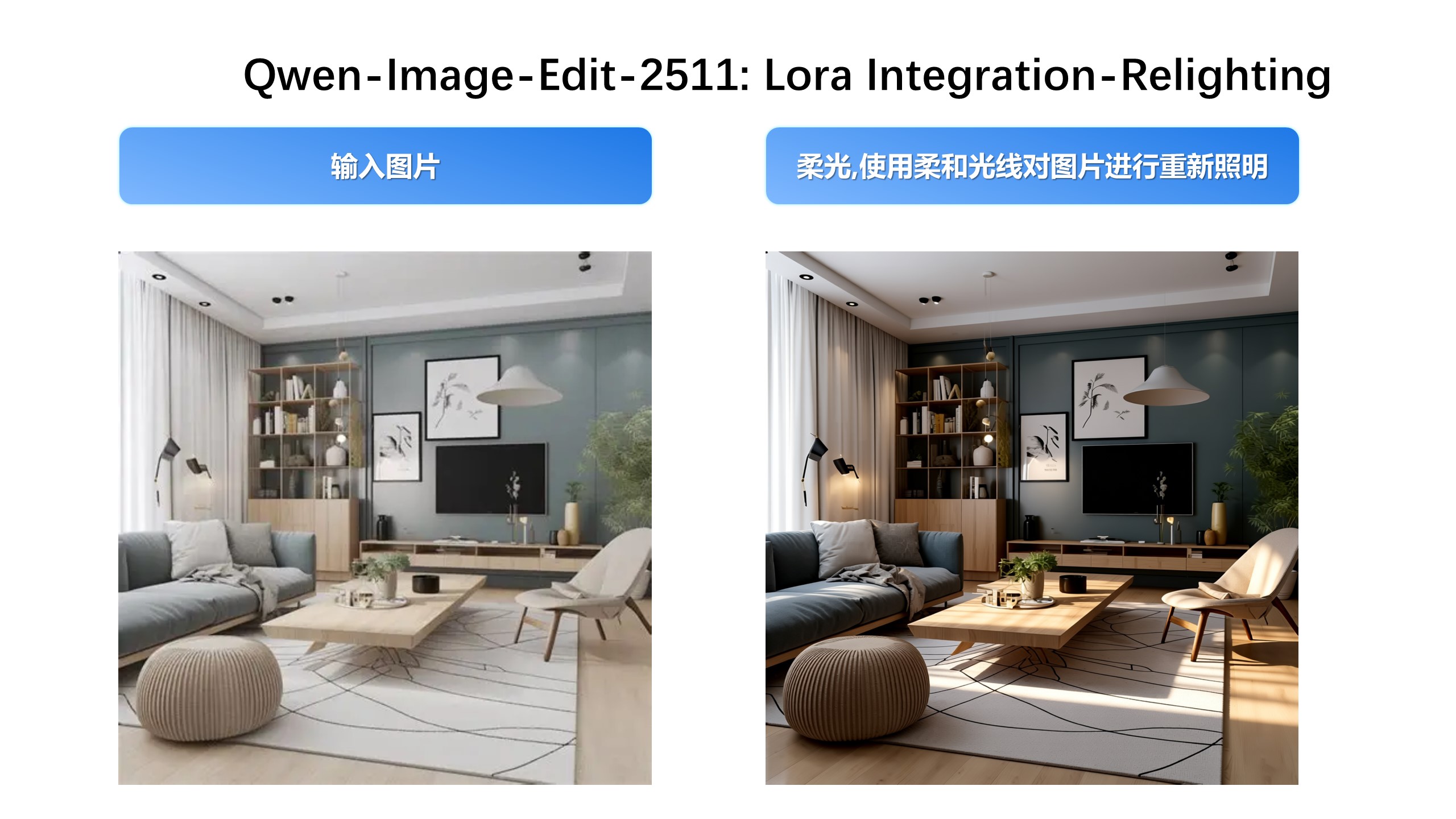
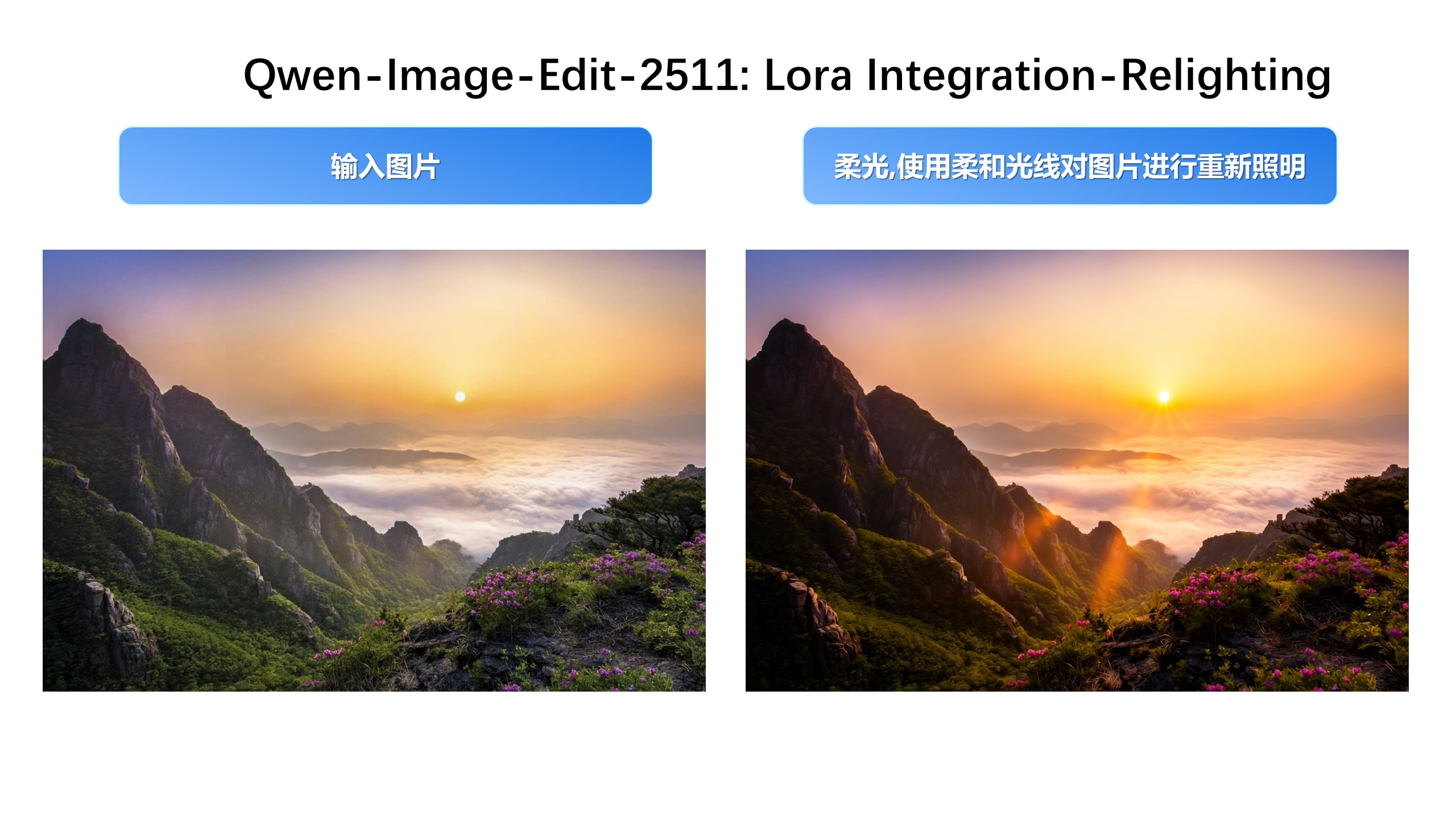
Since Qwen-Image-Edit’s release, the community has developed many creative and high-quality LoRAs—greatly expanding its expressive potential. Qwen-Image-Edit-2511 integrates selected popular LoRAs directly into the base model, unlocking their effects without extra tuning.
For example, Lighting Enhancement LoRA
Realistic lighting control is now achievable out-of-the-box:
Another example, generating new viewpoints can now be done directly with the base model:
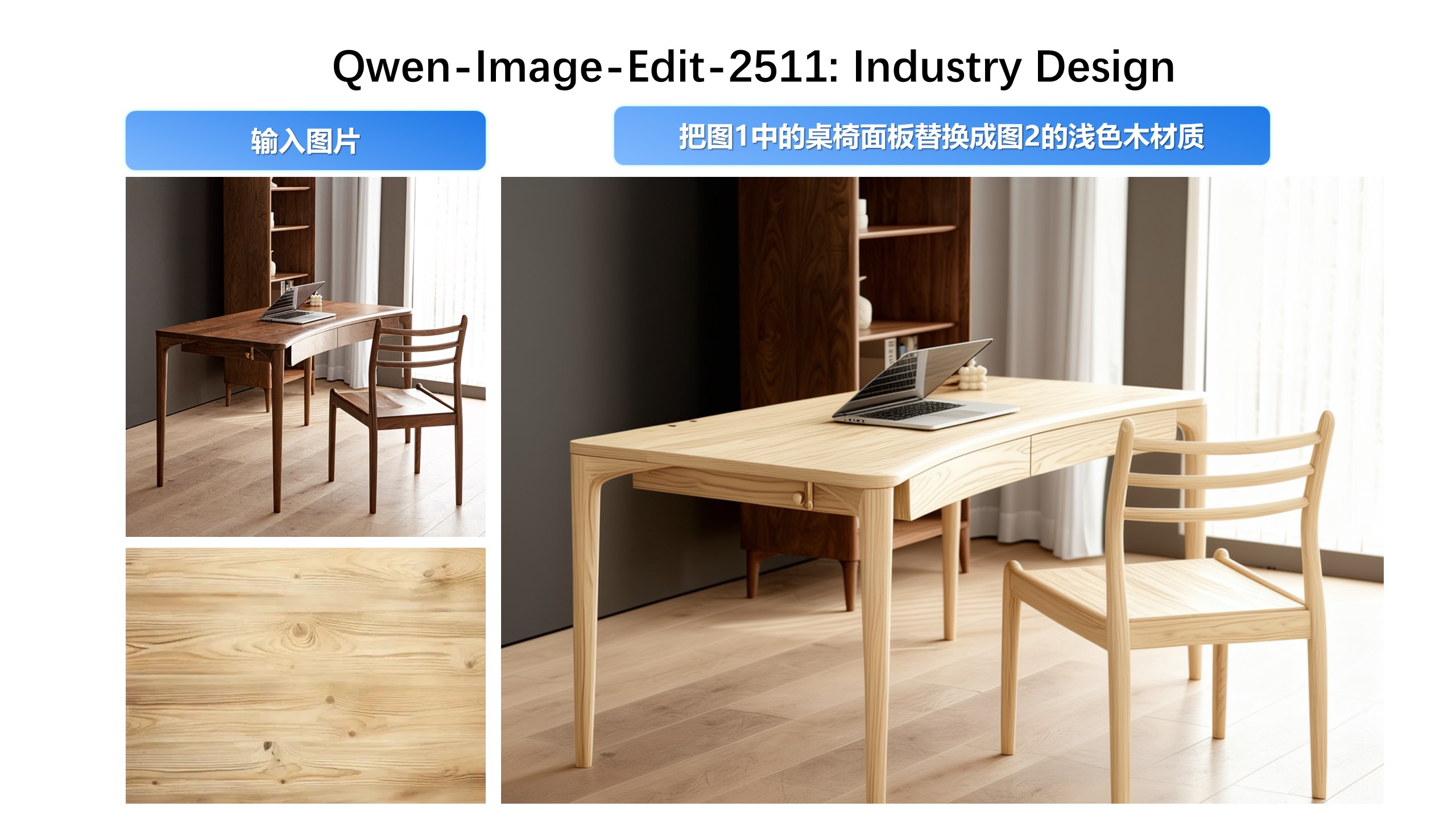
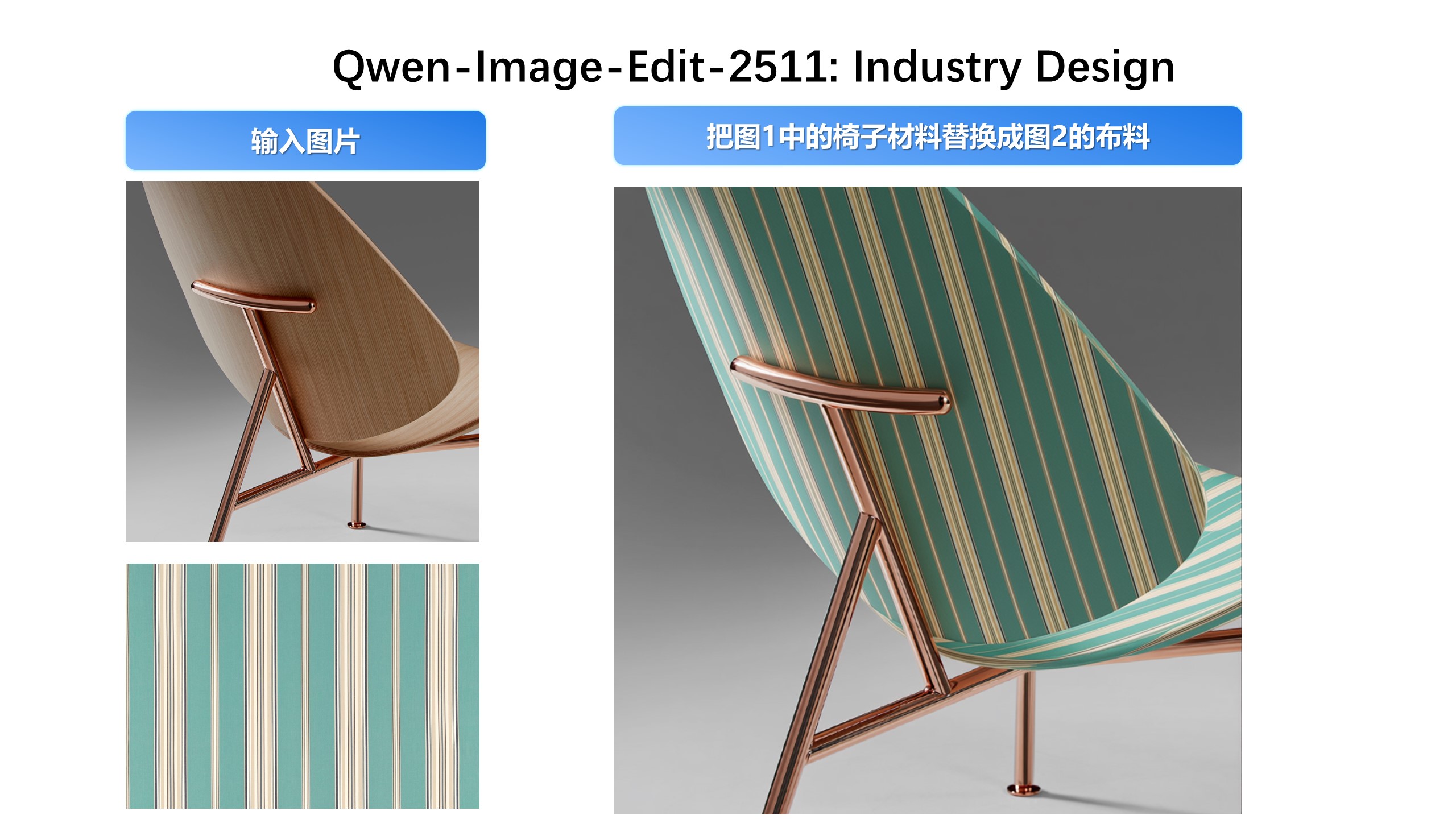
Industrial Design Applications
We’ve paid special attention to practical engineering scenarios—for instance, batch industrial product design:
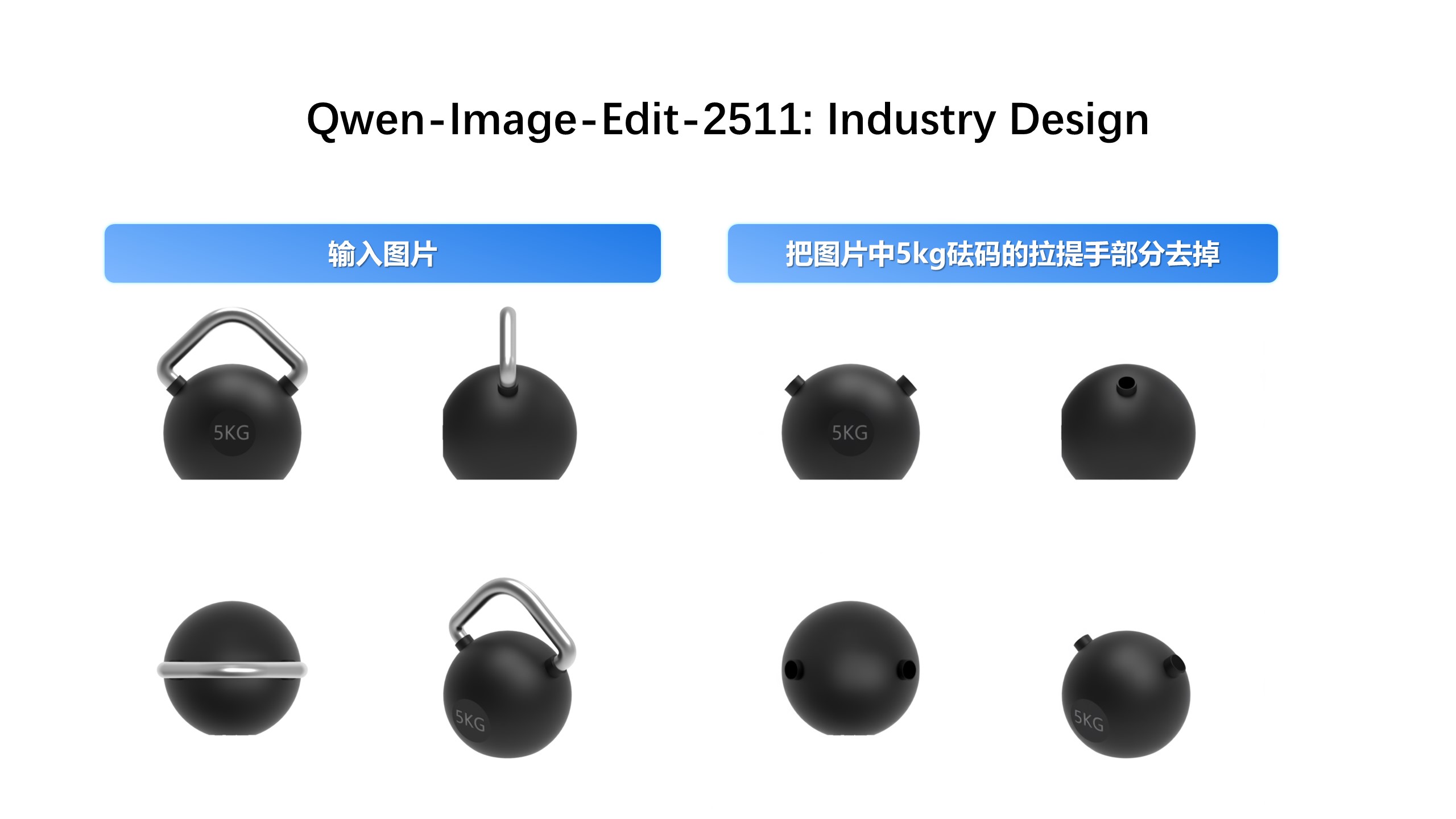
…and material replacement for industrial components:
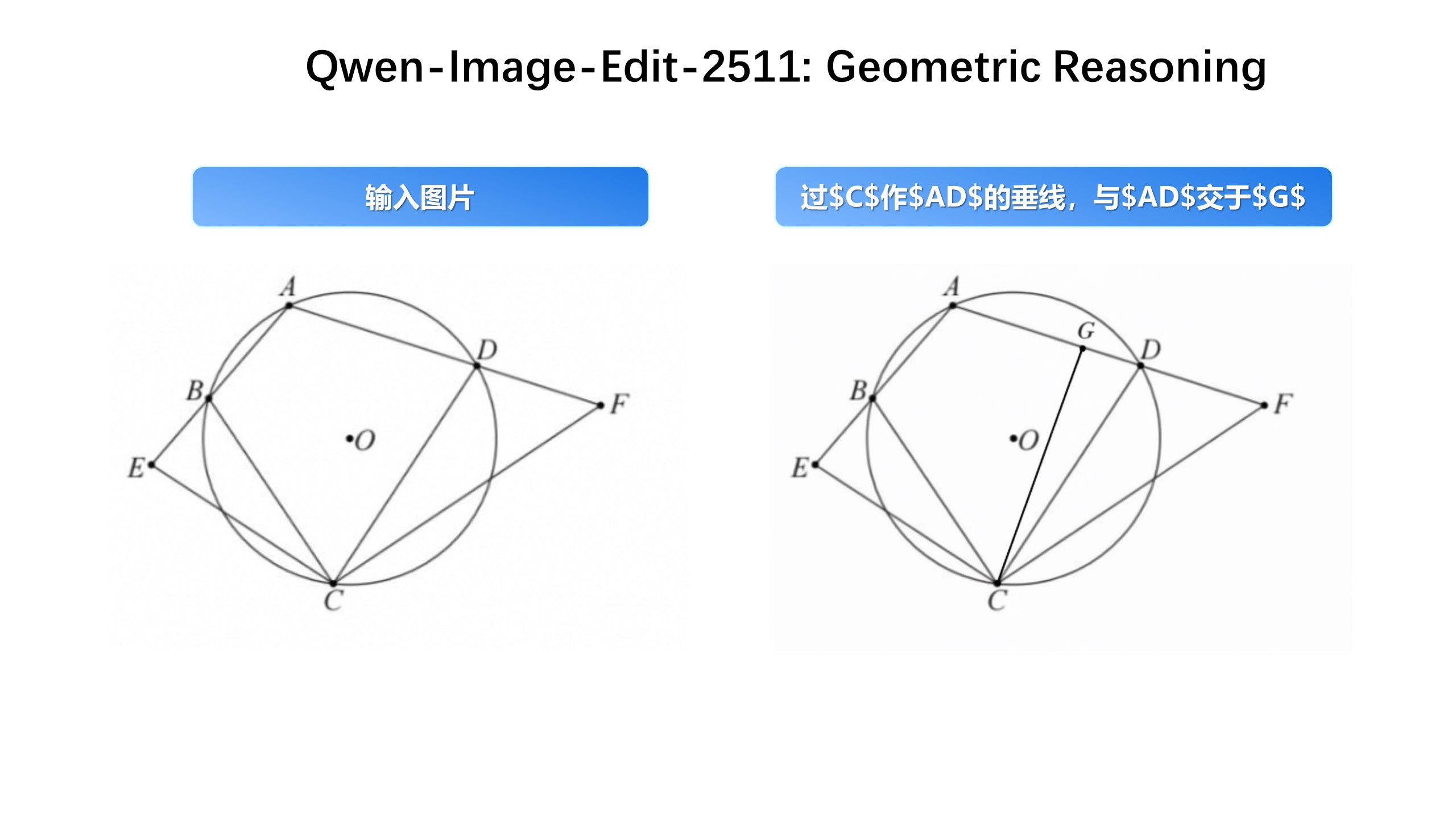
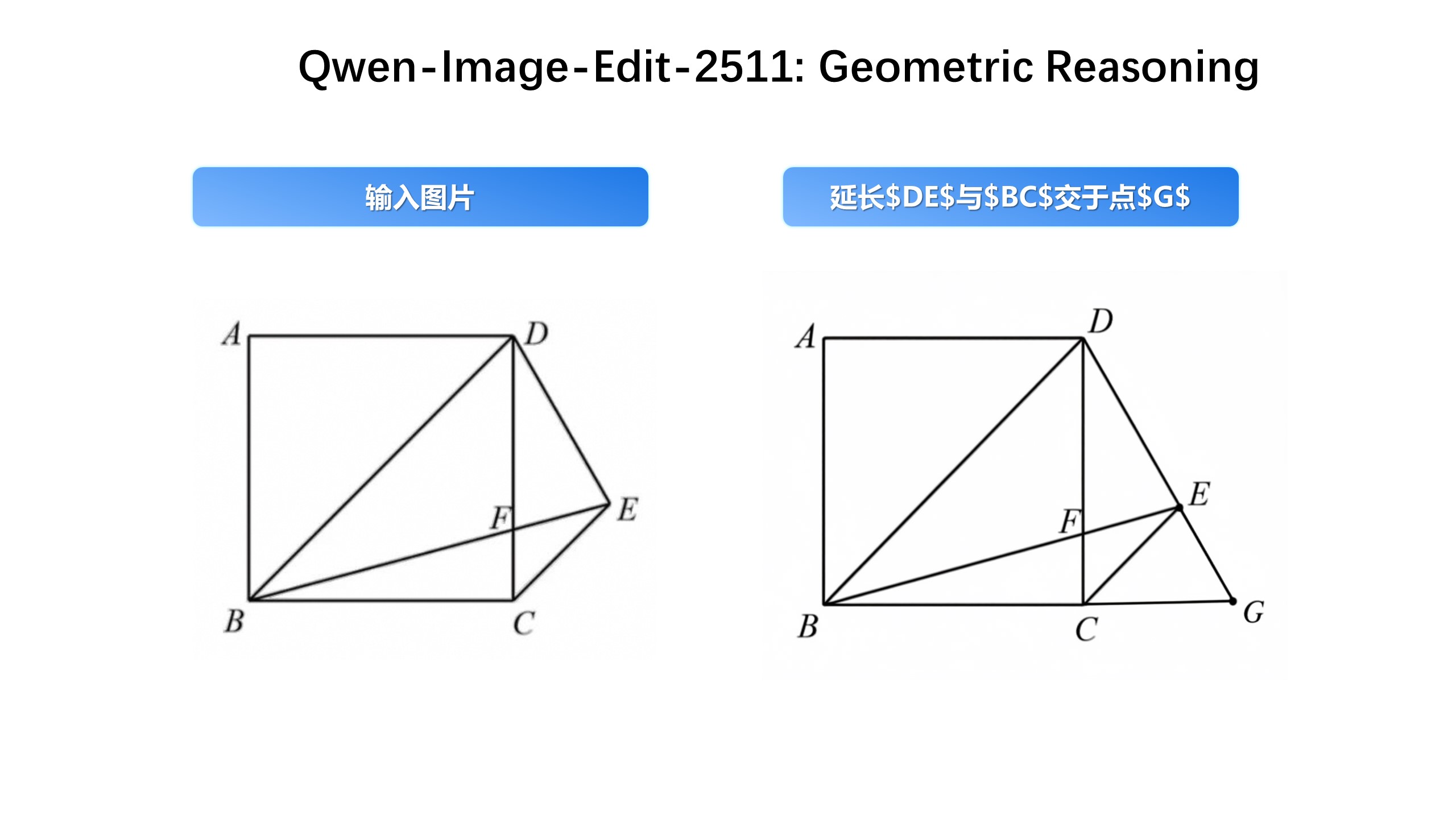
Enhanced Geometric Reasoning**
Qwen-Image-Edit-2511 introduces stronger geometric reasoning capability—e.g., directly generating auxiliary construction lines for design or annotation purposes:
That wraps up the major updates in Qwen-Image-Edit-2511.
Enjoy exploring the new capabilities! 🎉
License Agreement
Qwen-Image is licensed under Apache 2.0.
Citation
We kindly encourage citation of our work if you find it useful.
```bibtex
@misc{wu2025qwenimagetechnicalreport,
title={Qw